


Моделът вече не се продава. За консумативи и профилактика може да направите запитване по телефона или тук.
WorkCentre 3615
С функциите за копиране, печат, сканиране, изпращане на имейл и факс, черно-бялото мултифункционално устройство WorkCentre 3615 предлага пълен набор от инструменти в един мощен уред. Най-добрите в този клас скорост, резолюция на печат и капацитет за хартия ви помагат да създавате професионално изглеждащи документи за броени минути.
| Резюме | |
|---|---|
| Модел | 3615V_DN |
| Скорост на печат | до 45 стр./мин. |
| Възможности за свързване | 10/100/1000 BaseT Ethernet, High-Speed USB 2.0, USB Direct Print (като опция: Wi-Fi) |
| Двустранен печат | Стандартно |
| Работен цикъл | До 110,000 изображения/месечно* |
| Стандартен капацитет за хартия | 700 листа |
| Максимален капацитет за хартия | 2,350 листа |
| Next Steps | Request pricing info Find a local dealer › |
| Какво включва пакетът | • Тонер касета (капацитет: 5900 страници**) • Касета с барабан • Захранващ кабел • Факс кабел • Софтуер и документация • ЗАБЕЛЕЖКА: Някои съдържания могат да бъдат изпращани отделно |
* Maximum volume capacity expected in any one month. Not expected to be sustained on a regular basis.
** Средно стандартни страници. Обявен капацитет в съответствие с ISO/IEC 19752. Капацитетът ще варира за всяко отделно изображение, работна област и режим на печат.
| Конфигурации на модел | |
|---|---|
| 3615V_DN | |
| Скорост на печат | до 45 стр./мин. |
| Работен цикъл | До 110,000 изображения/месечно* |
| Скорост на процесора | 525 MHz |
| Памет (стандартна) | 1 GB стандартни |
| Възможности за свързване | 10/100/1000 BaseT Ethernet, High-Speed USB 2.0, USB Direct Print (като опция: Wi-Fi) |
| Двустранен печат | Стандартно |
| Copy | |
|---|---|
| Максимална разделителна способност на копиране | 600 x 600 dpi |
| Време за извеждане на първа страница, копиране | Само 8.5 секунди |
| Функции за копиране | Премахване на фона, Създаване на задание, Контрол на осветеността, Обиране на ръбове, Копиране на документи за самоличност, N-up, Режим за снимки, Предварително програмиране |
| Печат | |
|---|---|
| Максимална разделителна способност на отпечатване | 1200 x 1200 dpi |
| Време за извеждане на първата страница, печат | Само 6.5 секунди |
| Езици за описание на страница (PDL) | PCL® 5e emulation, PCL® 6 emulation, PDF емулация, Емулация на PostScript 3 |
| Функции за печат | Печат на брошури, Колиране, Нестандартен размер на страницата, Мащабиране до размера на страницата, N-up, Печат от USB памет, Мащабиране, Защитен печат, Режим на икономия на тонер, Водни знаци |
| Мобилен печат | Apple AirPrint, Xerox® PrintBack |
| Scan | |
|---|---|
| Местоназначение на сканиране | Сканиране към USB памет, Сканиране към компютър чрез SMB, Сканиране към имейл с поддръжка за LDAP, Сканиране към сървър през FTP, Сканиране чрез уеб услуги на устройства |
| Fax | |
|---|---|
| Факс функции | Адресен указател, Изпращане на факс, Отложен факс, Отличително позвъняване, Препращане на факс към факс, електронна поща и сървър с/без локален печат, Блокиране на нежелана факс кореспонденция, Заявка за получаване, Защитен факс: получаване** ** - Необходима е аналогова телефонна линия. |
| Компресиране на факс | MH/MR/MMR/JBIG |
| Драйвери за печат | |
|---|---|
| Съвместими ОС | HP UX® 11, HP UX® 11i, IBM AIX® 5, Mac OS® X 10.5 and later, Redhat Enterprise 4 и 5, Solaris 10, Solaris 9, Ubuntu®, Windows® 2003 Server, Windows® 2008 Server, Windows® 7, Windows® Vista, Windows® XP, Драйвер за принтер Xerox Global, Драйвер Xerox Mobile Express |
| Поддържани шрифтове | |
|---|---|
| PostScript® fonts | 136 |
| PCL® fonts | 93 |
| Работа с хартия | |
|---|---|
| Стандартен капацитет за хартия | 700 листа |
| Максимален капацитет за хартия | 2,350 листа |
| Производителност | 250 листа |
| Управление на документи | Двустранно автоматично листоподаващо устройство Капацитет: 60 листа 140 x 140 мм до 216 x 356 мм |
| Капацитет за хартия | Тава (Многофункционална тава): 150 листа Тава 1: 550 листа Тава 2 (като опция): 550 листа Тава 3 (като опция): 550 листа Тава 4 (като опция): 550 листа |
| Размер на хартията | Тава (Многофункционална тава): Нестандартни размери: 76 x 127 мм до 216 x 356 мм Тава 1: Нестандартни размери: 148 x 210 мм до 216 x 356 мм Тава 2 (като опция): Нестандартни размери: 148 x 210 мм до 216 x 356 мм Тава 3 (като опция): Нестандартни размери: 148 x 210 мм до 216 x 356 мм Тава 4 (като опция): Нестандартни размери: 148 x 210 мм до 216 x 356 мм |
| Security | |
|---|---|
| Функции за сигурност | Идентификация 802.1x, филтриране по IP адрес, IPSec, IPv6, Идентификация за достъп до мрежата, SNMPv3, Получаване на защитен факс, Защитен HTTPS (SSL) протокол, Защитен LDAP протокол, Защитен печат |
| Електрически данни | |
|---|---|
| Консумирана мощност | При печат: 698 W В режим на готовност: 59 W Спестена енергия: 4 W |
| Програма ENERGY STAR | Квалифициран по програмата ENERGY STAR® |
| Работна среда | |
|---|---|
| Температура (работна) | 15 - 28 ° C |
| Относителна влажност (при работа) | 20 - 70 % относителна влажност (без кондензация) |
| Размери | |
|---|---|
| Размер (Ш x Д x В) | 495 x 492 x 549 мм |
| Тегло | 21.5 кг |
* Maximum volume capacity expected in any one month. Not expected to be sustained on a regular basis.


| Toner Cartridges | ||
|---|---|---|
| Part # | Description | Капацитет |
| 106R02721 | P3610/Wc3615 5,900 Pages Toner, DMO | 5,900* |
| 106R02723 | P3610/Wc3615 14,100 Pages Toner, DMO | 14,100* |
| 106R02724 | Black Toner Cartridge | |
| 106R02732 | P3610/Wc3615 25,300 Pages Toner, DMO | 25,300* |
| Routine Maintenance Items | ||
|---|---|---|
| Part # | Description | Капацитет** |
| 113R00773 | Drum Cartridge | 85,000 |
* Средно стандартни страници. Обявен капацитет в съответствие с ISO/IEC 19752. Капацитетът ще варира за всяко отделно изображение, работна област и режим на печат.
** Приблизителни страници. Капацитет на барабаните при задания със среден размер от 3 страници, формат A4/писмо. Капацитетът на барабана и изпичащия модул варира в зависимост от продължителността на заданието, вида носител, размера, теглото, ориентацията и моделите на ползване.
| Xerox CentreWare™ Web Софтуер за управление на устройства на множество доставчици |
| Xerox Global Print Driver™ Улеснете работата си с един универсален драйвер за принтер, с който можете да отпечатвате на повечето принтери и МФУ |
| Xerox Mobile Express Driver™ Мобилните потребители печатат практически към всяко устройство с един универсален драйвер за печат. |
| Xerox PrintBack Personal printing for your iPhone®, iPod® touch, iPad®, or Android-based smartphones and devices |
| Xerox Scan to PC Desktop™ Document scanning, archiving, editing, organisation and PDF workflow tools to make scanning easy and personal. |
| Единна идентификационна система за сигурен достъп на Xerox™ Card-based security solution that enables users to authenticate at the MFP and securely retrieve print jobs |
| YSoft® SafeQ® Print solution featuring pull roaming follow, secure printing, authentication, authorization, accounting, reporting and mobile printing. |
| Productivity and Paper Handling | |
|---|---|
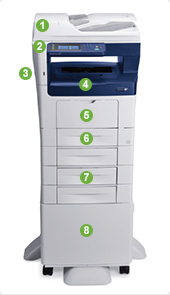 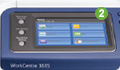  | Productivity and Paper Handling The WorkCentre 3615 multifunction printer offers a full productivity toolbox in one device, so you’re more efficient every day. 1. A 60-sheet Duplex Automatic Document Feeder scans two-sided originals for copy, scan and fax jobs. 2. The WorkCentre 3615 includes a 109 mm (4.3-inch) colour touch screen with easily understood instructions and help screens to streamline walkup operations. 3. An easily accessible USB port allows users to quickly print from or scan to any standard USB memory device. 4. 250-sheet output tray with tray-full sensor. 5. 150-sheet Multipurpose Tray handles media sizes from 76 x 127 mm to 216 x 356 mm (3 x 5 in. to 8.5 x 14 in.). 6. With the 550-sheet paper tray, standard paper capacity for the WorkCentre 3615 totals 700 sheets. 7. Up to three optional 550-sheet paper trays increase total paper capacity to 2,350 sheets. 8. Optional stand provides storage for toner cartridges, paper and other supplies. 9. Place the WorkCentre 3615 anywhere you need it with the optional Wi-Fi Network Adapter |
| Speed, Scanning and Print Quality | |
|---|---|
 |
|
| Speed, Scanning and Print Quality With best-in-class speed*, print resolution and media capacity, your busy office can deliver professional-looking prints, without waiting. |
|
| Built for speed. Print до 45 pages per minute (ppm) – the fastest monochrome print speed in its class*. Your first page prints in as few as 6.5 seconds. True multifunction capability. The intuitive 109 mm (4.3-inch) colour touch screen on the WorkCentre 3615 lets you program your next job while another is in progress. Digitize…and simplify. Easily turn cumbersome hard copy forms and documents into portable, digital files. Enjoy the added convenience of sharing your digital files automatically via email. You can even send your files to an established network folder or export them to any USB memory device. | Crisp details. Bring definition and clarity to your documents with true print resolution of up to 1200 x 1200 dpi. Your printed communications never looked better. * When compared to similar products as of September 2013. |
| Capabilities | |
|---|---|
 | Powerful Capabilities Built for Savings Advanced tools improve security and save paper, power and time. Reduce paper usage. You’ll dramatically lower your paper usage and related costs thanks to automatic two-sided printing. Plus, N-up printing enables you to print multiple pages on one sheet – a useful option when sharing presentations. Increase efficiency. Extra-high capacity toner cartridges allow you spend less time loading supplies and more time getting work done. Keep information safe. Secure Print keeps your sensitive documents out of the wrong hands by requiring users to enter a personal identification number at the device to print documents. Use less power. Unique Xerox® EA Toner fuses at a much lower temperature, reducing power consumption by up to 20% and CO2 emissions by up to 35%, compared to conventional toner. All-in-one savings. The WorkCentre 3615 combines the functions of a copier, printer, scanner and fax machine into a single, value-packed unit that can generate savings on energy and supplies costs. |
| Mobile Printing, Wi-Fi and Remote Management | |
|---|---|
| Work From Anywhere When you’re on the go, you can still print to the WorkCentre 3615, and manage it remotely from a web browser. |
|
   | Print when and where you want. With Apple® AirPrint™, you can print email, and important office documents, directly from your mobile iOS device when connected to your office Wi-Fi network. And when working offsite, you can rely on Xerox® PrintBack to print documents back at the office so they are waiting for you when you return. Freedom, unplugged. With optional Wi-Fi capabilities, the WorkCentre 3615 is ready to go to work wherever it’s needed. Manage from a web browser. Handle device administration remotely from any networked computer with Xerox® CentreWare® IS. |
| Публикации в пресата и награди | ||
|---|---|---|
| Публикация | Оценка/награда | Дата |
 PCMag.com | PCMag.com gave the WorkCentre 3615DN 4.5 out of 5 stars and an "Editor’s Choice" rating for the workhorse monochrome multifunction printer. The WorkCentre 3615DN is "suitable as a workhorse MFP in a small to mid-size office. It has excellent paper capacity for a printer of its class," says Samara Lynn, a lead networking and business analyst for PCMag. View the WorkCentre 3615DN PCMag video › | March 2014 |
PC Magazine | The WorkCentre 3615/DN multifunction printer received the PC Magazine "Editors' Choice" distinction for heavy-duty use in small to midsize workgroups. The monochrome multifunction printer's duty cycle, input capacity and fast speed helped it edge out the competition to earn 4.5 out of 5 stars and the PC Mag.com editors’ rating of "Excellent." More information › | November 2013 |
| Drivers & Downloads | За да изтеглите драйвъра на WorkCentre 3615, кликнете тук. От падащото меню “Operating System” посочете вашата операционна система. |
| Documentation | Кратко ръководство за употреба Repacking Instructions Device Memory Feed Roller Kit Maintenance Kit Paper Tray – 550 Sheets RAM Memory Smart Kit Drum Cartridge Stand Toner Cartridge Wireless Network Adapter Xerox® WorkCentre® 3615 System Administrator Guide Xerox® WorkCentre® 3615 User Guide Xerox Product EPEAT© Environmental Information |
| Contact | Свържете се с нас: гр. София, ул. “Проф. Хр. Вакарелски” 13-A ☏ (02) 862 30 37 ✆ 0887 78 77 90 ✉ eurocopy@eurocopy.bg |