




Моделът вече не се продава. За консумативи и профилактика може да направите запитване по телефона или тук.
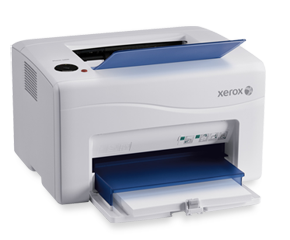
With a compact size that saves precious office space plus best-in-class print speed, Xerox makes colour the easy choice with the refreshingly office-friendly, value-packed Phaser™ 6000 colour printer.
| Резюме | |
| Модел | 6000v_b |
| Скорост на печат | цветни: до 10 стр./мин. black: до 12 стр./мин. |
| Работен цикъл | до 30,000 изображения/месечно1 |
| Стандартен капацитет за хартия |
150 листа |
| Производителност | 100 листа |
| Двустранен печат | manual |
| Максимална разделителна способност на отпечатване |
1200 x 2400 dpi |
| Функции за сигурност | филтриране по ip адрес |
| Възможности за свързване | usb 2.0 |
| Какво включва пакетът | начална тонер касета (капацитет: 500 страници2) захранващ кабел usb кабел софтуер и документация забележка: някои съдържания могат да бъдат изпращани отделно |
| Конфигурации на модел | |
| Скорост на печат | цветни: до 10 стр./мин. black: до 12 стр./мин. |
| Работен цикъл | до 30,000 изображения/месечно |
| Двустранен печат | manual |
| Време за извеждане на първата страница, печат | само 17 секунди цветни / 14 секунди черно-бяло |
| Максимална разделителна способност на отпечатване | 1200 x 2400 dpi |
| Процесор | 192 mhz |
| Памет (стандартна) | 64 mb стандартни |
| Възможности за свързване | usb 2.0 |
| Езици за описание на страница (pdl) | хост-базирани |
| Функции за печат | само черно-бял режим на печат, печат на брошури, вградени връзки за поддръжка, колиране, нестандартен размер на страницата, икономичен режим (чернова), мащабиране до размера на страницата, n-up, отпечатване на плакати, печат в черно-бял режим (run black), мащабиране, пропускане на празни страници, водни знаци |
| Технология на печат | hiq led машина |
| Гаранция | едногодишна поддръжка на място |
| Драйвери за печат | |
| Съвместими ОС |
fedora™ core 4, linux red hat enterprise 4, mac os® version 10.5 or higher, suse ™ 10.x, suse ™ 11.x, windows® 2003 server, windows® 2008 server, windows® 7, windows® vista, windows® xp |
| Работа с хартия | |
| Капацитет за хартия | тава 1 (основна тава): 150 листа |
| Размер на хартията | тава 1 (основна тава): нестандартни размери: 76,2 x 127 мм до 215,9 x 355,6 мм |
| Типове печатни носители | тава 1 (основна тава): с покритие, обложка, пликове, етикети, обикновена хартия, обикновена хартия – твърда, пощенски картички, рециклирана хартия |
| Максимален капацитет за хартия | 150 листа |
| Производителност | 100 листа |
| Двустранен печат | manual |
| Управление на цветове | |
| Инструменти за управление на цветове | pantone® colour approved solid-colour simulations |
| Device management | |
| Функции за управление на устройството | помощна програма за настройка на принтер, printingscout™ alert notification |
| Eлектрически данни | |
| Kонсумирана мощност | при печат: 165 w в режим на готовност: 30 w спестена енергия: 8 w |
| Програма energy star | квалифициран по програмата energy star® |
| Работна среда | |
| Температура (работна) | 5 – 32 ° c |
| Относителна влажност (при работа) | 10 – 85 % относителна влажност (без кондензация) |
| Нива на звукова мощност | 6.14 b (в работно състояние), 3.72 b (в режим на готовност) |
| Размери | |
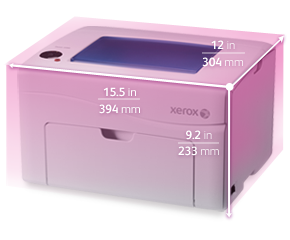
| Минимални размери (ш x д x в) | 394 x 304 x 233 мм |
| Тегло | 10.7 кг |
| Certifications | |
| Certifications | сертифициран по ul 60950-1/csa 60950-1-07, 2-ро издание, директива 2004/108/ео за електромагнитна съвместимост, en 55022 клас b, en 55024, en 60950-1, 2-ро издание, федерална комисия по комуникациите част 15, клас b, директива 2006/95/еио за ниско напрежение, директива 2002/95/еио относно ограничението за употреба на определени опасни вещества в електрическото и електронно оборудване (еео), известна като rohs 2 директива. |


| Toner Cartridges | ||
| Part # | Description | Kапацитет |
| 106R01631 | Cyan standard capacity toner cartridge (1000 pages), phaser 6000/6010 and workcentre 6015, dmo | 1,000* |
| 106R01632 | Magenta standard capacity toner cartridge (1000 pages), phaser 6000/6010 and workcentre 6015, dmo | 1,000* |
| 106R01633 | Yellow standard capacity toner cartridge (1000 pages), phaser 6000/6010 and workcentre 6015, dmo | 1,000* |
| 106R01634 | Black standard capacity toner cartridge (2000 pages), phaser 6000/6010 and workcentre 6015, dmo | 2,000* |
*Средно стандартни страници. Обявен капацитет в съответствие с ISO/IEC 19798. Капацитетът ще варира за всяко отделно изображение, работна област и режим на печат.
| Kонкурентоспособност | • The phaser 6000 colour printer is faster than other printers in its class • A smaller footprint means you can locate the phaser 6000 where it’s most convenient • Proven hi-q led print engine consumes low energy and space and produces low noise |
| Print Quality Features | • Hi-Q led print engine uses the same breakthrough technology found in some of our higher-end graphic arts devices • A print resolution of 1200 x 2400 dpi delivers an amazing 16 shades of colour per pixel. that means a wider colour range for more impressive business graphics • Unique Xerox EA ECO toner technology gives you crisp text and printed images with superior detail and clarity. it’s the same high-quality toner used in our professional graphic-arts colour devices • PANTONE® colour approved solid-colour simulations and xerox colour correction technology provide easy tools for precisely matching the colours of important business assets, such as company logos |
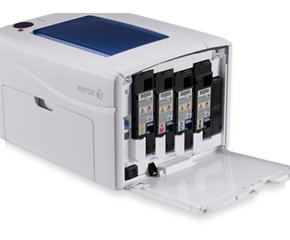
| Reliability and Ease-of-use Features | • Print on everything from labels to cardstock to envelopes • Outstanding reliability is backed by xerox with a one-year on-site warranty • Easy installation and pre-loaded toner cartridges make this printer virtually plug-and-play • Super-quiet operation lets you keep your printer nearby for distraction-free convenience • The Run Black feature lets you keep printing in black-and-white even if the printer runs out of colour toner • Only four replacement items: the ultra-slim, easy-to-load toner cartridges that come with less packaging and take up less storage space |
| Productivity Features | • The value-packed Phaser 6000 colour printer means business for your desktop, providing real-world print productivity and a host of built-in features • Superior performance gets your jobs out quickly, with print speeds as fast as 10 ppm for colour and 12 ppm for black-and-white • A 192 MHz processor and 64 MB standard memory handle your daily workload — even pages with graphics, photos and charts |
Personal printing for your iPhone®, iPod® touch, iPad®, or Android-based smartphones and devices. You already use a printer with your desktop or laptop computer. Now you’ve added a smartphone and/or tablet into your work life – accessing email, viewing documents, and integrating your device with other business processes formerly confined to your computer. With Xerox PrintBack, you can extend the printing capabilities of your computer to your iOS and Android™-based smartphones and tablets.
Ideal for environments where software and solutions are installed by individuals, Xerox PrintBack enables printing to the default printer you already use with your computer. Plus, it supports the most common office file types (Microsoft® Office documents, PDF, etc.) and delivers uncompromised print quality.
Изтегляне на брошурата ›
Free Download
Xerox PrintBack is a free download.
Download the free PrintBack agent and PrintBack app ›
Основни характеристики
With PrintBack, Xerox is offering a personal-class solution that enables mobile printing from your mobile device. If you need to print during the course of your job, you most likely have a printer installed for use with your computer. By taking advantage of this existing capability, PrintBack delivers:
Support for the documents you already print from your computer, including Microsoft Office* (Word, PowerPoint®, Excel®), Adobe® PDF, and more
High-quality output, because the print driver (and its default settings) installed on your computer are used to print the job
Job submission simplicity, because the use of the online service avoids issues with printer discovery and selection
Support for any printer, regardless of connection type, print technology, or manufacturer
Photo Shoot mode submits photos for mobile printing and/or saving as you take them within the application, a handy feature for realtors and others who take photos on the go
Additionally, PrintBack takes advantage of the connection it establishes between your device and your computer by allowing you to easily save documents or photos from your device to the Downloads folder on your computer, or to your Dropbox account – either during a print job, or instead of a print job.
| Drivers & Downloads | За да изтеглите драйвъра на Phaser 6000, кликнете тук. От падащото меню „Operating System“ посочете вашата операционна система. |
| Documentation | • Кратко ръководство (BG) • Printing multiple pages on a single sheet (n-up) (ENG) • User guide (ENG) • Quick use guide (ENG) • Installation guide (ENG) • Repacking instructions (ENG) • Toner cartridge (ENG) |
| Contact | Свържете се с нас: гр. София, ул. “Проф. Хр. Вакарелски” 13-A ☏ (02) 862 30 37 ✆ 0887 78 77 90 ✉ eurocopy@eurocopy.bg |